Transparent boundaries II
Learning targets
Transparent boundary conditions
Inhomogeneous exterior domain
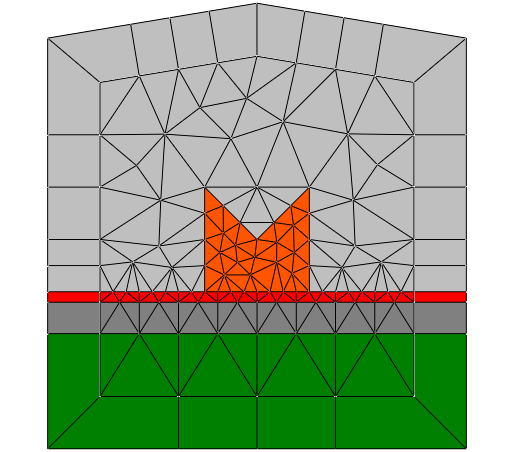
This example contains a 2D layout with transparent boundaries
on all faces of the computational domain. The lower part of the
computational domain contains a layered structure. Note that
JCMgeo automatically extends this layered structure to the
exterior domain.
I.e., this geometry models a single object placed
on a layered structure which extends to infinity.
The resulting geometry and mesh correspond to the following figure:
.jcm Input File
layout.jcm [ASCII]
 1Layout2D {
 2  Name = "TutorialExample2D"
 3  UnitOfLength = 1e-06
 4
 5  MeshOptions {
 6    MinimumMeshAngle = 20
 7    MaximumSideLength = 1.5
 8  }
 9Objects {
10  Polygon {
11    Name = "ComputationalDomain/Background"
12    DomainId = 1
13    Priority = -1
14    Points = [-3 -3, 3 -3, 3 3, 0 3.5, -3 3]
15    Boundary {
16      Class = Transparent
17    }
18  }
19  Polygon {
20    Name = "Object"
21    DomainId = 2
22    Priority = 1
23    Points = [-1 -1, 1 -1, 1 1, 0 0, -1 1]
24    MeshOptions {
25      MaximumSideLength = 0.6
26    }
27  }
28  Polygon {
29    Name = "Layer1"
30    DomainId = 3
31    Priority = 1
32    Points = [-3 -1.2, 3 -1.2, 3 -1, -3 -1]
33  }
34  Polygon {
35    Name = "Layer2"
36    DomainId = 4
37    Priority = 1
38    Points = [-3 -1.8, 3 -1.8, 3 -1.2, -3 -1.2]
39  }
40  Polygon {
41    Name = "Layer3"
42    DomainId = 5
43    Priority = 1
44    Points = [-3 -3, 3 -3, 3 -1.8, -3 -1.8]
45  }
46}