Waveguide Input
Learning targets
Transparent boundary conditions in 3D
Inhomogeneous exterior domain: waveguides and layered media
Boolean Difference
This example describes a computational domain with transparent boundary conditions at all sides. In this case, waveguides are included some of which touch the boundary of the computational domain, and which are modeled to extend also to the exterior domain. Further, a substrate is included which also extends to the exterior domain.
The following figure shows an image of parts of the geometry and mesh:
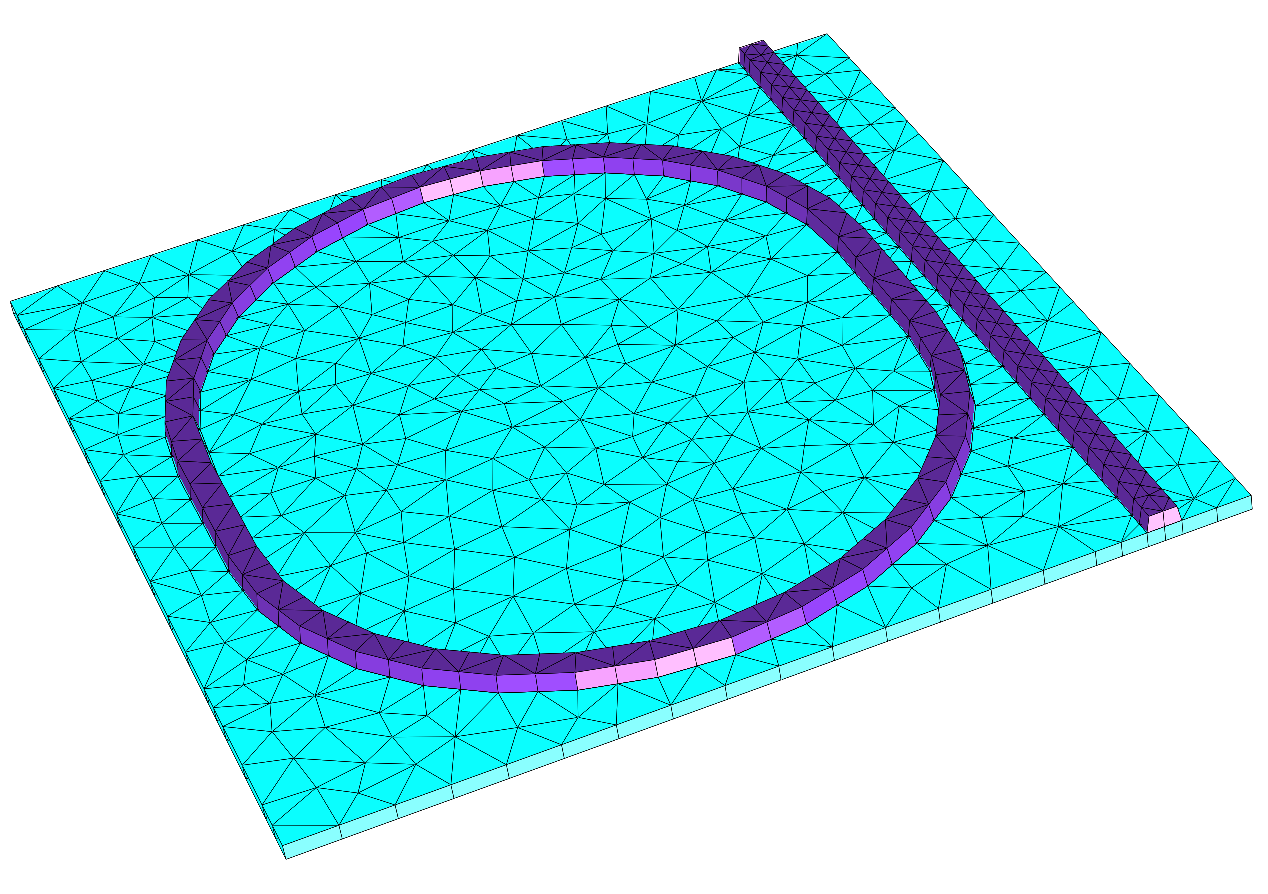
The waveguides exhibit a sidewall angle for the vertical flanks. This is achieved by a normal displacement of the waveguide structure during the extrusion process. To ease this we use the Boolean difference operator to form the ring resonator, so that we can apply the normal shift on the entire ring composed from the different geometrical primitives. For the straight waveguide adjacent to the ring we only apply the displacements on segments which are not extended to the exterior domain. Here, a SegmentNormalDisplacement is used in place of the NormalDisplacement.
Input Files
layout.jcm [ASCII]
  1
  2Layout3D {
  3  Name = "TutorialExample3D"
  4  UnitOfLength = 1e-06
  5
  6  MeshOptions {
  7    MaximumSideLength = 1
  8    MinimumMeshAngle = 18
  9
 10  }
 11  Extrusion {
 12    Objects {
 13      Parallelogram {
 14        DomainId = 10
 15        Priority = ComputationalDomain
 16        Name = "ComputationalDomain"
 17        Width = 14
 18        Height = 14
 19        GlobalPosition = [-5 0]
 20        Boundary {
 21          Class = Transparent
 22        }
 23      }
 24
 25      Parallelogram {
 26        Name = "Waveguide"
 27        DomainId = 20
 28        Priority = 1
 29        Width = 0.5
 30        Height = 14
 31        SegmentNormalDisplacement {
 32          Segment = [2 4]
 33          Value {
 34            PiecewiseLinear {
 35              AtInterface {
 36                Interface = 1
 37                Value = 0
 38              }
 39              AtInterface {
 40                Interface = 2
 41                Value = 0.05
 42              }
 43            }
 44          }
 45        }
 46        MeshOptions {
 47          MaximumSideLength = 0.45
 48        }
 49      }
 50
 51      BooleanOperation {
 52        Operator = Difference
 53        DomainId = 20
 54        Name = "Ring"
 55        A {
 56          Parallelogram {
 57            Name = "P"
 58            Width = 10.5
 59            Height = 2.5
 60          }
 61          CircleSector {
 62            Radius = 5.25
 63            RefineAll = 2
 64            AngleRange = [0 180]
 65            Alignment {
 66              Parent {
 67                Domain = "P"
 68                Port = North
 69              }
 70              Orientation = AntiParallel
 71            }
 72          }
 73          CircleSector {
 74            AngleRange = [0 180]
 75            Radius = 5.25
 76            RefineAll = 2
 77            Alignment {
 78              Parent {
 79                Domain = "P"
 80                Port = South
 81              }
 82              Orientation = AntiParallel
 83            }
 84          }
 85        }
 86
 87        B {
 88          Parallelogram {
 89            Name = "P"
 90            DomainId = 25
 91            Width = 9.5
 92            Height = 2.5
 93          }
 94          CircleSector {
 95            Radius = 4.75
 96            RefineAll = 2
 97            AngleRange = [0 180]
 98
 99            Alignment {
100              Parent {
101                Domain = "P"
102                Port = North
103              }
104              Orientation = AntiParallel
105            }
106          }
107          CircleSector {
108            Radius = 4.75
109            RefineAll = 2
110            AngleRange = [0 180]
111            Alignment {
112              Parent {
113                Domain = "P"
114                Port = South
115              }
116              Orientation = AntiParallel
117            }
118          }
119        }
120        Alignment {
121          Parent {
122            Domain = "Waveguide"
123            Port = Center
124          }
125          Orientation = Parallel
126          Displacement = [-5.8 0.0]
127        }
128        NormalDisplacement {
129          PiecewiseLinear {
130            AtInterface {
131              Interface = 1
132              NormalDisplacement = 0
133            }
134            AtInterface {
135              Interface = 2
136              NormalDisplacement = 0.05
137            }
138          }
139        }
140      }
141    }
142    MultiLayer {
143      Layer {
144        Thickness = 0.225
145        DomainIdMapping = [10 1, 20 1]
146      }
147      LayerInterface {
148        GlobalZ = 0.0
149      }
150      Layer {
151        Thickness = 0.25
152        DomainIdMapping = [10 3, 20 2]
153      }
154      Layer {
155        Thickness = 0.225
156        DomainIdMapping = [10 3, 20 3]
157      }
158    }
159  }
160}
161
162
163
164